Results 1 to 7 of 7

Thread: Removing UHF Antenna Base

  1. #1
    Join Date
    Jan 1970
    Location
    Brisbane, north of the river
    Posts
    1,924
    Total Downloaded
    0

    Question Removing UHF Antenna Base

    G'day all,

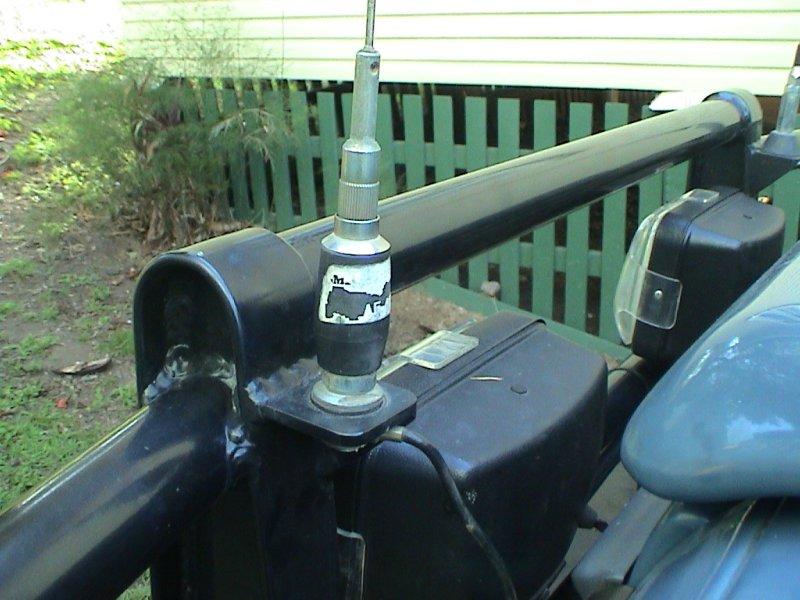
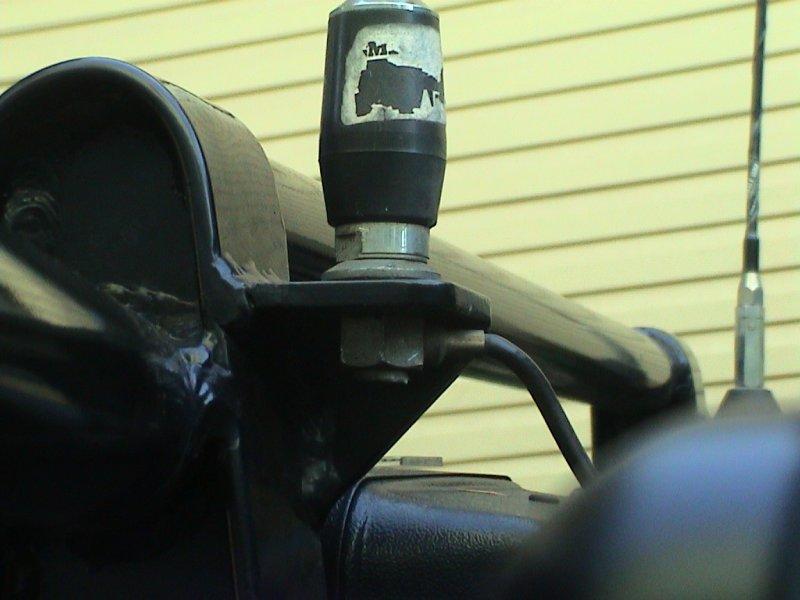
    I went to do some work on the Defender today but I can't figure out how to remove the UHF antenna base.

    Here are some shots of what is installed:


    I need to get the antenna base / cable to a state where I can take it back through the front grill.

    I'd prefer not to damage the existing installation of course

    Anyone have any ideas?

  2. #2
    Join Date
    Jun 2006
    Location
    Arnhem Land, NT
    Posts
    8,492
    Total Downloaded
    0
    I'm guessing but it looks like you put a spanner on the slots above the mount and unscrew the arial and black base. The flat part should be a ring to clamp the bottom threaded connector to the mount. The only issue then is whether the aerial lead is screwed, clamped, soldered or molded into the bottom portion.
    MY15 Discovery 4 SE SDV6

    Past: 97 D1 Tdi, 03 D2a Td5, 08 Kimberley Kamper, 08 Defender 110 TDCi, 99 Defender 110 300Tdi[/SIZE]

  3. #3
    Join Date
    Jan 1970
    Location
    Brisbane, Queensland (Australia)
    Posts
    1,461
    Total Downloaded
    0
    Only a guess, but it looks like the cable goes through the bottom nut.

    Maybe use one spanner to hold the bottom nut and one to turn the base unit.


    oops, dm_td5 beat me to it!

  4. #4
    Join Date
    Jan 1970
    Location
    Cessnock NSW
    Posts
    4,990
    Total Downloaded
    0
    G'day All, post number 2 is correct on how to unscrew the aerial from the base, after doing that you will need to un-solder the PL-259 plug at the radio end, the cable going into the nut on the base cannot be interefered with at all, to re-assemble it is a reversal and solder, use an ohm meter to check for continuity and that you haven't earthed out you cable at the PL 259 plug, i.e in other words the very thin wire in the center of cable/coax cannot touch the earth part of the PL 259 plug, does that make sense to you cheers Dennis
    Last edited by Dinty; 1st October 2006 at 05:02 PM.

  5. #5
    Join Date
    Jan 1970
    Location
    Brisbane, north of the river
    Posts
    1,924
    Total Downloaded
    0
    G'day all and thanks for your replies.

    So lets see if I've got this right.

    In order to fit a new grill (which means I have to take out the existing wires, then re-run them back through the new grill) I have to un-solder my UHF antenna cable at the radio end? Then do the reverse when finished fitting the new grill?

    Is that right?

    If so I think I'll go have a drink and a long hard think about it.

  6. #6
    Join Date
    Jun 2006
    Location
    Arnhem Land, NT
    Posts
    8,492
    Total Downloaded
    0
    It can be easier to unscrew the aerial from the radio and run it back through firewall etc. If the firewall opening will allow the whole PL259 plug through or has a micro plug on it, then you're laughing. It is possible though that the aerial wire can be detached from the mounting end if it is screwed on it will be in the same way as the radio end.

    I think that makes sense
    MY15 Discovery 4 SE SDV6

    Past: 97 D1 Tdi, 03 D2a Td5, 08 Kimberley Kamper, 08 Defender 110 TDCi, 99 Defender 110 300Tdi[/SIZE]

  7. #7
    Join Date
    Jan 1970
    Location
    Brisbane, Queensland (Australia)
    Posts
    1,461
    Total Downloaded
    0
    My son (an auto lecky) fitted mine to the Discovery and I think he had to cut the cable when he removed it from my last Defender. I think he fitted joiner plugs and new cable from there to the radio. Possible loss of current does not seem to be a problem.

    Just analyse the situation before jumping in. Unsoldering at the radio end and resoldering won't be a big issue. As mentioned the plug might go through the firewall while still connected.

Bookmarks

Bookmarks

Posting Permissions

  • You may not post new threads
  • You may not post replies
  • You may not post attachments
  • You may not edit your posts
  •  
Search AULRO.com ONLY!
Search All the Web!